Raw device mapping (RDM) is an option in the VMware virtualization that enables a logical unit number (LUN) to be directly connected to a virtual machine (VM) from the storage area network (SAN).
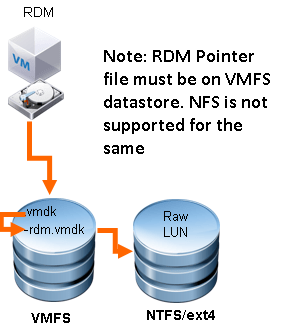
RDM uses SAN commands (SCSI) to improve performance in I/O-intensive applications.
RDM can be configured to operate in virtual compatibility mode or physical compatibility mode.
- Virtual mode:
- Provides benefits that are available in VMFS, such as snapshots.
- In Virtual mode RDM, only READ/WRITE SCSI Command is passed directly to storage and rest are virtualized by VMKernel.
- In virtual mode RDM, file extension used is rdm.vmdk for pointer file.
- Physical mode:
- Provides access to most hardware functions and physical device characteristics of the storage system that is mapped.
- In physical mode RDM, only SCSI command that is virtualized by VMKernel is ReportLUN.
- Rest all commands are passed directly to storage. In physical mode RDM, file extension used is rdmp.vmdk for pointer file.
You can use physical mode RDM for below use cases.
-
- VM running with applications that are SAN aware
- Microsoft failover cluster quorum disk configurations
- Performing P2V, you can skip copying data of existing mapped LUN on physical server if data size is too large, instead re-map the LUN to VM after P2V is done.


 Virtual Maestro
Leave a reply to Sneha Cancel reply